a look at my recent work
Connect CSR
Modernizing the Customer Service Experience for Utilities
Overview
Cayenta’s legacy Customer Information System (CIS) is a powerful but complex desktop application used by utilities to manage customer accounts, billing, and service interactions. Over decades of client‑specific customizations, CIS became overloaded with features, inconsistent in its UI, and difficult for Customer Service Representatives (CSRs) to navigate quickly during live calls.
Connect CSR was created to solve this problem: a modern web application focused solely on CSR workflows, enabling them to complete 90% of their daily calls efficiently and confidently.

Connect CSR dashboard for the customer care representative
The Challenge
A Convoluted Legacy System
-
CIS served multiple departments (billing, customer service, etc.), resulting in a cluttered interface.
-
Many features were built for one client’s needs and didn’t apply to others.
-
Clients often added their own customizations, creating mismatched icons, layouts, and workflows.
• Training new CSRs took hours because the system was not designed around their specific tasks
A Need for a Streamlined, CSR‑Focused Experience
CSRs needed:
-
A clear starting point during calls
-
Faster access to customer records
-
A consistent, intuitive interface
-
Reduced context switching between screens

Account record in CIS (legacy application)
in dark theme
My Role
I joined the Connect CSR team as the in‑house Product Designer after the MVP was created by a third‑party contractor. Over a two‑month knowledge‑transfer period, I became responsible for:
-
Extending and maintaining the design system
-
Designing new features and user flows
-
Conducting usability studies
-
Collaborating closely with Product, Business Analysis, and Development
-
Ensuring high‑quality implementation through ongoing reviews
When new UI components or icons were needed, I created them in Figma to match the established design system.

Updated design for the account overview after customer and stakeholders’ feedback
Design Improvements
During gaps between sprints, I redesigned the Overview screen to address clarity and hierarchy issues.
Key improvements:
-
Added borders to visually group sections
-
Introduced icons to improve scannability
-
Increased header sizes for better readability
-
Stakeholders immediately noted that the screen felt “much clearer” and “easier to navigate.”
We moved Notes from a hidden tab to a persistent right‑hand panel after observing how often CSRs switched back and forth between sections. This change reduced context switching, allowed CSRs to reference notes while viewing customer history, and improved both call efficiency and accuracy.


Usability test results for Bill Inquiry
Quality Assurance & Iteration
I led a bi‑weekly UX review during sprint demos. Developers showcased their work, allowing me to:
-
Catch UI inconsistencies early
-
Identify missed interactions
-
Prioritize fixes for the next sprint
I logged into the demo environment to test the implemented features. I documented discrepancies between the build and the Figma designs and shared them with the developer manager, who created JIRA tickets for resolution.

Bill inquiry flow that shows projected and comparable details
Outcome & Impact
-
Beta testing for the MVP launched in June 2022.
-
The success of Connect CSR sparked strategic discussions to modernize the entire Cayenta product suite, which has been in existence for over 25 years.
-
Connect CSR became a model for future product design across the organization.

I created a calendar-style display to show multiple bills and upcoming collection events

The History tab displays billing and service events
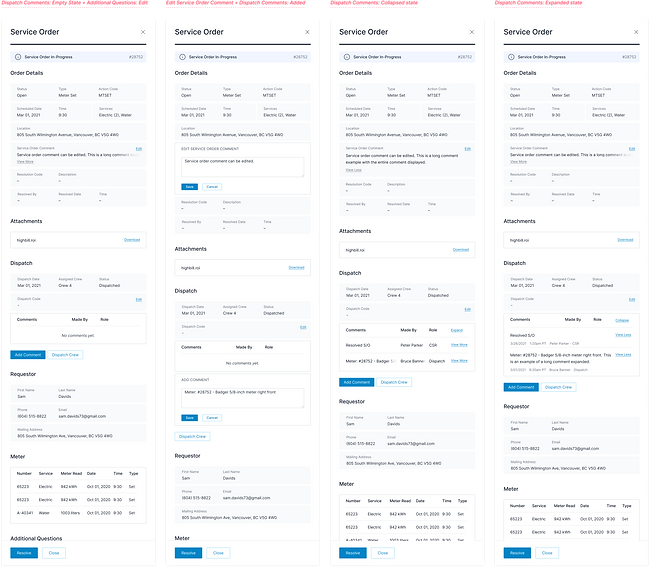
A workflow that enables a CSR to create a service order and dispatch a crew